Procedures
Keeping your changes between live sessions
A live session normally forgets everything at shutdown. Persistence adds a writable layer so settings, files and installed packages survive the reboot — within limits worth knowing before you rely on it.
Key points
- The image stays read-only; changes go to a separate overlay file.
- The overlay cannot grow past the size you chose when creating it.
- It is convenience, not backup — one stick is one point of failure.
How it works
A live system runs from a compressed, read-only image. Without persistence, writes land in memory and vanish at shutdown. Persistence adds a second layer: a file or partition that the system stacks on top of the read-only image using an overlay file system. Reads fall through to the image; writes land in the overlay; what you see is the two merged.
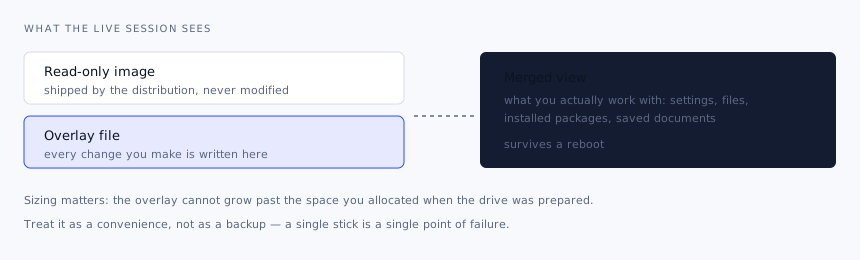
Setting it up
Support and naming vary by distribution, so check the documentation for the release you are using. Broadly:
Confirm the image supports it
Debian, Ubuntu and their derivatives do, with different label conventions. Some images do not support it at all, and no tool can add the capability from outside.
Create the overlay
Either a partition or a file, depending on what the distribution expects. Image-loader tools generally offer to create and manage it for you, which is the least error-prone route.
Label it correctly
The live system finds the overlay by label — commonly
persistenceorcasper-rw. The wrong label means the session simply starts fresh with no error at all.Boot and confirm
Create a file, reboot, check it is still there. Do this before you depend on it, not after a day's work.
Sizing the overlay
| Use | Reasonable size |
|---|---|
| Settings, network profiles, a few documents | 2–4 GB |
| Extra packages and a working set of files | 8–16 GB |
| Development tools, a language toolchain, project files | 32 GB or more |
Overlays generally cannot be resized in place, so err upward. Remember that package updates in a live session consume overlay space quickly — every updated package is written in full.
Where it falls short
- Kernel updates. The kernel lives in the read-only image. Updating it inside a live session often does nothing useful and can leave the session inconsistent.
- Overlay exhaustion. When it fills, the session starts failing in confusing ways — writes silently failing, applications refusing to start.
- Performance. Overlay writes on flash are slow, and slower still on an old stick. A live session with persistence is not a workstation.
- Resilience. A single stick that gets lost, snapped or corrupted takes the overlay with it.
When to use something else
If you want a portable system you use daily, install the distribution properly onto an external SSD rather than running a live session with persistence. You get a normal system, normal updates, real performance and the option to encrypt it. Persistence is at its best for what it was designed for: a live environment that remembers your Wi-Fi password and your keyboard layout between uses.
Back up what matters. Copy anything important off the overlay onto ordinary storage the same day you create it. Treat the stick as a working environment, not as the only copy of anything.